
Every product designer eventually faces the same challenge before a single line of code gets written: what should this app actually look like? For fictional or speculative interfaces — a sci-fi movie’s holographic dashboard, a game’s in-world device screen, a concept pitch for an app that doesn’t exist yet — that question gets even more open-ended.
An AI image generator from text gives designers a fast way to explore that visual territory before committing to a direction, and Dreamina is particularly effective at rendering the kind of clean, detailed interface mockups that make a fictional app feel believable.
Here’s how to design an interface for something that doesn’t exist yet.
Why interface concepts need visual storytelling, not just wireframes
A fictional app interface isn’t just about layout — it’s about communicating a world through design choices. A gritty cyberpunk hacking tool should look and feel completely different from a friendly wellness app in a utopian setting, even if both technically display similar information.
Establishing the world your interface belongs to
Before designing anything, define the broader context: is this a corporate dystopia, a playful near-future consumer product, a mysterious ancient technology reimagined digitally? That context shapes every visual decision that follows.
- A corporate or dystopian setting suggests cold colors and rigid grids
- A playful consumer product suggests rounded shapes and warm accents
- An ancient or mystical technology suggests organic shapes and glowing symbols
Choosing a device or context for the interface
An interface floating in empty space rarely feels convincing. Placing it on a wrist device, a tablet, a holographic projection, or a character’s field of view gives the design a physical context that makes it feel like a real product rather than an abstract graphic.
A closer look at Dreamina’s model lineup
Dreamina offers several distinct image generation models, and interface concept work benefits from knowing which one fits the task.
Seedream 5.0 Pro, the newest and most capable model, handles geometric precision and fine interface detail especially well, which matters enormously for design work where straight lines, consistent spacing, and legible small elements all need to hold together convincingly. It’s the strongest choice for hero concept images meant for a pitch deck or portfolio piece.
Nano Banana offers fast generation, useful for quickly testing several stylistic directions — glassy and translucent versus flat and minimal — before settling on one. GPT Image 2 handles prompts with several specific interface elements described at once, useful when your concept includes multiple data panels or features you want represented accurately.
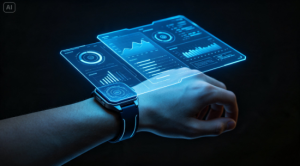
From concept to interface mockup in three moves
Dreamina turns interface ideas into polished visual concepts without requiring actual UI design software.
Step 1: Enter a text prompt
Open Dreamina and describe your fictional interface in detail — its purpose, visual style, color scheme, and the device or context displaying it. If you have reference images of similar UI aesthetics, upload them alongside your text.
Example: A sleek fictional app interface concept displayed on a person dressed as a field researcher holding a transparent tablet device, clean minimalist data panels, soft green and white color scheme, futuristic sans-serif typography, studio lighting.
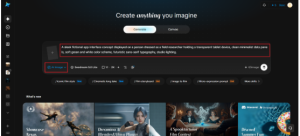
Step 2: Modify parameters and generate
Select Image 5.0 Pro, powered by Seedream 5.0 Pro, for clean geometric precision and consistent interface detail, then set your aspect ratio, canvas size, and resolution — 1K for quick concept exploration, 2K for presentation-ready mockups. Click the generate icon to render your interface concept.
Step 3: Customize and download
Refine your mockup using Dreamina’s tools: inpaint to adjust specific interface elements or icons, expand to reveal more surrounding context, remove to simplify a busy panel, and retouch for a final polished look. Once it’s ready, click Download.
Designing information hierarchy even in a concept image
Even a purely conceptual interface benefits from a sense of visual hierarchy — a clear focal element, supporting data in smaller type, and generous negative space rather than cramming everything into one dense panel. This makes the concept read as a thoughtful design rather than decorative noise.
Color and typography as world-building tools
Interface color and font choices communicate personality almost instantly. Sharp, monospace-style typography reads as technical or clinical; soft, rounded typography reads as friendly and approachable. Choosing these details deliberately reinforces the fictional world your interface belongs to.
Iterating on interaction states, not just a single static screen
A single polished screen tells only part of an interface’s story — the most convincing fictional UI concepts show how it might respond, not just how it sits idle. Generating a handful of variations on the same interface — an alert or notification state, a loading or scanning animation frozen mid-motion, a “success” or confirmation panel — helps a design feel like a real, functioning system rather than a one-off illustration.
This is especially useful for pitch decks and portfolio pieces, where showing two or three states side by side signals that the designer thought through how the interface actually behaves, not just how it looks in a single frame. Keeping the same color palette, typography, and layout logic across these variations, while changing only the specific state being shown, reinforces the sense that it’s one coherent product rather than several disconnected concepts.
Where these interface concepts get used
Fictional UI concepts built this way support several kinds of creative projects:
- Film and game pre-production concept art
- Product pitch decks for speculative app ideas
- Sci-fi and futuristic short story illustrations
- Portfolio pieces for UI and UX designers exploring speculative work
Designing the future before it exists
Some of the most memorable fictional technology in film and games started as a single striking interface concept. With Dreamina and the geometric precision of AI algorithms, you can explore that same kind of speculative design work quickly — and it costs nothing to start imagining what comes next.